This article provides an introduction to the TOSCA Test Automation Tool. This article covers the major components of TOSCA and details the TOSCA Commander and Workspace.
Tosca has emerged as one of the most commonly adopted enterprise test automation frameworks due to its capability to offer automation without requiring extensive coding.
Whether you are a manual tester looking at automation or an experienced QA tester considering Tricentis Tosca for your SAP application, web application, API, or enterprise application testing, this tutorial will definitely help you get started from ground zero.
In this step-by-step tutorial, you will discover what Tosca is all about, how to develop test modules and test cases, how the execution workflow functions, and how automation projects are carried out.
This tutorial will give you a basic idea about Tosca automation so that you can start working on it with confidence.

List of Tutorials in this TOSCA Series
Tutorial #1: Introduction To Tricentis TOSCA Automation Tool (This Tutorial)
Tutorial #2: Create And Manage Workspaces In Tricentis TOSCA Automation Tool
Tutorial #3: How To Create & Execute Test Cases In Tosca Testing Tool?
Follow all three parts to gain a complete understanding of Tosca automation from scratch.
In this tutorial, you will learn what exactly Tricentis Tosca Test Suite is, what the key components of the software are, and the key elements of the software, i.e., Tosca Commander, Tosca Workspace, mapping, linking, the Details tab of Tosca Commander, etc., in a step-by-step manner.
TOSCA stands for Topology and Orchestration Specification for Cloud Applications.
Table of Contents:
What Is Tosca Automation?
Tosca Automation is a model-based test automation product developed by Tricentis to help users automate tests for web applications, desktop applications, mobile applications, APIs, SAP systems, and enterprise applications with minimal coding effort.
As compared to other automation products, which require a lot of scripting, Tosca Automation is based on a non-scripting and visual test creation process in which testers design test modules and test cases.
Tosca Automation supports complete software development life cycle testing, thus enabling users to enhance test coverage and increase test automation efficiency. It also supports business process testing, which makes it an ideal choice for enterprises.
What Makes Tosca Different From Other Automation Tools
One of the most significant distinctions between Tosca and other automation solutions is the implementation of Model-Based Testing (MBT). Users will no longer have to create scripts for each individual test, but will create reusable models that can then be utilized in several tests.
This greatly diminishes the necessity of knowing how to program and makes it easier to modify tests when application changes happen.
In addition, Tosca features such capabilities as risk-based testing, test case design, API testing, and enterprise application testing, thus making it unnecessary to use several third-party software products at the same time.
Key Features of Tosca
Among the most notable features of Tricentis Tosca are the following:
- Model-driven test automation
- Test automation that requires minimal coding
- Cross-browser and cross-platform testing
- Testing of web applications, desktop applications, mobile apps, APIs, and SAP systems
- Reusable test objects
- Risk-based testing
- Test data management
- Continuous testing and integration into continuous integration/continuous delivery pipeline
- End-to-end validation of business processes
- Automated test execution and reporting
This technology enables companies to expand their automation activities without having to deal with maintenance expenses.
Why Enterprises Use Tosca?
The reason why many companies prefer Tosca is that they can achieve higher speeds and less maintenance of their tests when compared to those based on scripts. Many large corporations operate complex software applications, including ERP and CRM systems, APIs, and old systems.
All these complications in testing can be solved by Tosca, which provides reusable testing resources and allows the management of all the tests in one place. In addition, it also supports enterprise software, such as SAP, Salesforce, Oracle, and cloud apps.
What Is Tricentis TOSCA Testsuite™?
TOSCA Testsuite™ is a software tool for the automated execution of functional and regression software testing.
In addition to testing automation functions, TOSCA includes:
- Integrated Test Management
- Graphical User Interface (GUI)
- Command Line Interface (CLI)
- Application Programming Interface (API)
The test suite supports the entire lifecycle of the test project. It starts with transferring and synchronizing specifications from the requirements management system.
TOSCA supports its users in creating efficient test cases on a methodologically sound basis, serves as an executive assistant, and summarizes the test results in various reports.
TOSCA Testsuite™ is designed and developed by Tricentis Technology & Consulting GmbH (an Austrian software company based in Vienna)

TOSCA Testsuite™ Components
Various Components & System under Test

As displayed in the above picture, the various components of the test suite are
- TOSCA Commander
- TOSCA Wizard
- TOSCA Executor
All three of these are at the client-side; it also includes the Repository (also called “Test Repository”), which is at the server-side.
TOSCA Commander™
This is the graphical user interface of TOSCA Testsuite™. It is considered to be the core of the test suite. The commander uses a “Workspace” for the administration of test cases. This means it enables the easy creation, management, execution, and analysis of test cases.
As it is the middleware system in between the Test Repository and TOSCA Executor, it gets the test cases from the repository and forwards it to the Test Executor, which later runs them on the System Under Test (SUT).

All elements are displayed in a tree structure (sample screenshot above). The left section of the window is used for navigation, whereas the right section is the working area.
The above screenshot is a sample of the “Test Case” window; likewise, other windows (Requirement, ExecutionList, etc.) have the same layout. All elements in TOSCA Commander™ are structured underneath one another in a strictly observed hierarchical order. Each operation can only be performed by observing this object hierarchy.
It provides a Drag-and-Drop feature that is used to move the elements around within the application. It also has a docking function that allows the user to customize the window’s layout as they need it.
So TOSCA Commander™ provides these kinds of features and functionalities to the user for their convenience. It operates similarly to Windows Explorer. While creating the folder structure, one can use commands like create, copy, paste, rename, delete, etc.
TOSCA Workspace
This is your personal work area where you can create, administer, execute, and analyze test cases. It contains various objects i.e., called TOSCA Commander™ Objects, and those are,
- Modules
- ExecutionLists
- TestCases
- Requirements
- Test Case Design
You can build the relationship between these objects by mapping/linking them. This is called object mapping in TOSCA. At runtime, the control information of these objects (Modules, ExecutionLists, TestCases, and Requirements, etc.) is combined.
TOSCA Commander™ Objects – Organized in “Worlds”
TOSCA Commander™ Objects are categorized in different worlds, and each object is recognized individually by a specific color.

We have another object i.e. “Reporting” objects that are also having a world called World of Reports. This is not required for beginners; hence, I will not discuss this in detail for now.
TOSCA “Worlds” & its Workflow:

Given below is a snapshot of how the TOSCA project window looks in its colored worlds.

How Tosca Automation Works
Tosca automation involves the use of model-based testing methodology. Application components are recognized and represented as reusable models rather than being coded into the test script.
Modules of the application components are created, joined together to form test scenarios and executed using the Tosca workspace. MBT makes testing more efficient by reducing the maintenance overheads.
Tosca’s Model-Based Testing Explained
Model Based Testing (MBT) is the basis of the Tosca automation process. Rather than writing code for each testing scenario, testers analyze the application components and build the reusable models, which are referred to as Modules. Modules include buttons, text boxes, menus, hyperlinks, and many more.
When once created, a module can be used for testing many different test cases. When there is a change in the interface of the application being tested, the tester does not need to make changes everywhere in the test script. It helps save effort and time and increases scalability in automation.
Benefits of Model-Based Testing:
- Less reliance on coding skills
- Better test case reusability
- Easier to maintain test scripts for applications that change
- Helps speed up test creation and run
Tosca Architecture Overview
The workflow typically follows this sequence:
Application Scan → Module Creation → Test Case Design → Test Execution → Result Analysis
With this structure, testers can undertake big projects in automation without having issues regarding consistency or reusability.
Tosca uses a well-designed architecture structure; the following table shows its components then purpose:
| Component | Purpose |
|---|---|
| Workspace | Central repository for all testing assets |
| Modules | Store scanned application elements |
| TestCases | Contain automation steps and validations |
| TestCase Design | Manages reusable test data and templates |
| Execution Lists | Organize and execute test runs |
| Test Data Service | Stores and manages test data |
| Reports | Display execution results and logs |
Mapping/Linking In TOSCA
Linking, importing external data, and exporting data are possible in TOSCA. Given below is some insight into how linking is done in TOSCA.
Linking of external files: There are two ways that an external file can be linked in TOSCA i.e.
- By drag-and-drop with basic objects in TOSCA Commander
- By using the operation “Attach File” from the context menu
So these are the 2 ways of linking the files in TOSCA. Now we will see the different types of links available in TOSCA.
There are three types of links i.e.
- Embedded
- Linked
- LinkedManaged
Embedded: This is Embedding of a file in the TOSCA Repository
Linked: A file will be referred to, but not hosted in the repository. The link refers to the source directory for the file.
LinkedManaged: The file is copied to a specified directory that is generally accessible, and from there, it will be centrally managed.
This is how an external file or external data can be imported into TOSCA. Likewise, data from TOSCA can also be exported to other files (e.g., MS Word, MS Excel, etc.) via the clipboard by
- Selecting a line or an area in the right section of a TOSCA Window and pressing <CTRL> + ‘C’
- Using the operation “Copy table to clipboard” from the context menu
TOSCA Commander™ – Details Tab
In the above picture, you can see the “Details” tab on the right-hand side of the window of the TOSCA Commander. So each object in TOSCA has a Details view where various columns can either be added or removed as needed.
How to Add a Column:
1. Right-click on the header of a column, and select the option “Column Chooser” from the context menu. A window opens containing a list of available columns.
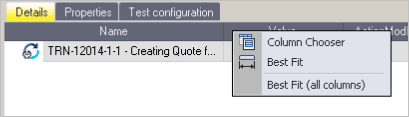
2. Drag the required column onto an existing column header. The new column is automatically added to the position that is marked by two arrows.

How to Remove a Column:
- Select the header of the column that should be removed and keep the left mouse button pressed.
- Drag the column downwards until the mouse pointer has the shape of an X, and release the mouse button.
Frequently Asked Questions
1. What is Tosca automation used for?
Some applications of Tosca automation include automating testing on web, desktop, mobile, APIs, SAP, and enterprise applications. Tosca enables organizations to carry out functional tests, regression tests, business processes, and continuous tests with minimal manual input.
2. Is Tosca easy for beginners?
Yes, Tosca automation can be described as beginner-friendly due to its low-code nature. In contrast to other automation tools that require extensive coding skills, Tosca enables users to write automated tests by using models that can be reused.
3. Does Tosca require coding?
Tosca does not need much programming knowledge to automate processes. Testing experts can design, control, and run automation test processes through Tosca’s model-based testing tool. Nevertheless, a basic level of programming expertise would come in handy while dealing with complex automation procedures.
4. How long does it take to learn Tosca?
It depends on one’s previous experience in testing. Beginners can grasp the basic concepts behind Tosca, including its modules, workspaces, and test cases, in just a matter of weeks. However, mastering advanced features such as API testing, test data management, and enterprise automation could take several months.
5. What is the difference between Tosca and Selenium?
The major distinguishing point between Tosca and Selenium is that Tosca is a low-code, model-based automation tool while Selenium is an open-source automation testing platform that requires some coding skills. Tosca comes with a wide variety of features that include test management, test reports, and enterprise application testing, among others.
6. Is Tosca good for SAP automation?
Certainly, Tosca is highly regarded when it comes to SAP automation testing. In addition, Tosca supports SAP GUI, SAP Fiori, and other SAP environments.
7. What is Tosca Commander?
Tosca Commander is the interface used in Tricentis Tosca for the creation and management of workspaces, modules, test cases, execution lists, test data, and automation reports. This is the interface that controls the testing operations.
8. How do you create test cases in Tosca?
The process of creating a test case in Tosca involves scanning the application with XScan to generate modules, which are later included in a TestCase. The next step is setting the test steps, input values, and validations. The test case can then be run using an Execution List.
9. Is Tosca certification worth it?
Certification in Tosca is certainly beneficial for professionals working in quality assurance and automation testing. It provides evidence of skill and knowledge related to Tosca automation concepts and will likely give an advantage when searching for new employment prospects in companies using Tricentis’ tools for enterprise testing.
10. What companies use Tricentis Tosca?
Companies that implement Tricentis Tosca include a variety of corporations from different industry sectors like banking, health care, insurance, retailing, manufacturing, and telecom. These corporations operate complex business systems such as SAP, Salesforce, Oracle, and custom-made enterprise applications.
Conclusion
In this introductory tutorial, we covered the major components of the Tricentis TOSCA testing tool and details of the TOSCA Commander and Workspace. This is enough information to get started with TOSCA. More information about the Workspace and its types, the check-in/check-out concept for TOSCA objects, will be covered in the next article.
Have you tried the TOSCA Automation Tool yet?
Explore the tutorials below for more helpful information on Automation Testing.
- What is Automation Testing? Guide with a Simple Example
- Automation Testing Process: How to Start Automation Testing
- Test Automation Strategy and Best Practices with Example
- When To Go for Automation Testing?
Was this helpful?
Recommended Reading
-

This SOAtest Tutorial explains how to create a sample project, .tst file, test suite, and REST Client in Parasoft SOAtest. It also presents you with a glossary of the most important terms and describes major components of the application. It will provide you with an example of how a .tst…
-

This tutorial explains how to create and manage TOSCA Workspaces. You will also learn about the Import, Export, and Checkout Process for TOSCA objects. In our precious TOSCA Series For Beginners, we discussed the overview of the TOSCA automation tool to help beginners get started with it in our previous…
-
This tutorial explains how to create and execute manual as well as automation test cases in TOSCA, along with the requirements, modules, and reports in TOSCA. In the previous tutorial of this Easy TOSCA Guide for Beginners, we explored how to create and manage workspaces in Tricentis Tosca in detail.…
-
LoadRunner Tutorials: Hands-on free training course for beginners (and helpful for experienced professionals as well!) Micro Focus LoadRunner (earlier HP) is one of the most popular load testing software. It is used to performance test an application under the load. It can simulate thousands of concurrent users to produce real-time load…