Visual Studio Code 1.125
Follow us on LinkedIn, X, Bluesky
Release date: June 17, 2026
Downloads: Windows: x64 Arm64 | Mac: Universal Intel silicon | Linux: deb rpm tarball Arm snap
Welcome to the 1.125 release of Visual Studio Code. This release brings a smarter integrated browser, more control over extension updates, and stronger enterprise management for Copilot.
-
Install model providers: Discover and install extra models via the Marketplace.
-
Integrated browser: Search the web and securely browse over remote connections without leaving VS Code.
-
Configurable auto-update delay: Choose how long VS Code waits before installing extension updates.
-
Copilot policies: Deliver managed Copilot settings through your existing device management tooling.
Happy Coding!
Agents
View your additional spend usage in VS Code
To make sure you stay ahead of overage charges, the Copilot status dashboard now shows the percentage of your additional Copilot budget that you've consumed, so you can adjust your usage before you hit your configured limit.

You can view detailed usage and manage your additional spend in the Copilot settings.
Language Models
Install model providers from the Language Models editor
Beyond Bring Your Own Key (BYOK) models, extensions can contribute their own model providers. Previously, to find such an extension, you needed to know the right tag (language-models) to search for in the Extensions view.
Now the Language Models editor has an Install Model Providers button that opens the Extensions view filtered to extensions that contribute model providers, making it easier to discover and install them. After you install a provider, its models appear in the model picker alongside any others you have configured.
To learn more, see the language models documentation.
Integrated Browser
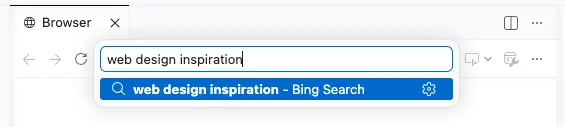
Web search from address bar
Setting: workbench.browser.searchEngine
Look up information without leaving VS Code: type a query into the integrated browser's address bar and it runs against your configured search engine, the same way it would in a standalone browser. Use the workbench.browser.searchEngine setting to pick which search engine to use.
Browse over remote connections (Preview)
Setting: workbench.browser.enableRemoteProxy
When the integrated browser is opened in a remote workspace, web traffic over HTTP(S) can now be proxied via the remote connection. This lets you securely connect to any ports or services that are only accessible from the remote machine.
This is a preview feature, so you might encounter bugs. Enable the workbench.browser.enableRemoteProxy setting to try it out, and file any issues you encounter in the VS Code repository.
Better agentic interaction with forwarded ports
If you have forwarded a port in a remote workspace, previously agents could have difficulty opening the browser due to a potentially different port number.
Now, if an agent requests a port that has been forwarded (and the remote proxy is not enabled), the URL is rewritten and the agent is notified of the change.
Editor Experience
Extension auto-update setting
Setting: extensions.autoUpdate This setting is managed at the organization level. Contact your administrator to change it.
You can enable or disable automatic extension updates with the
extensions.autoUpdate
This setting is managed at the organization level. Contact your administrator to change it. setting. In this release, we simplified the setting to use on and off values. Previous values such as true, false, onlyEnabledExtensions, and delayed are migrated automatically.
When auto-update is enabled, VS Code updates only enabled extensions. Disabled extensions are no longer updated automatically. They update the next time you enable them.
Note: Administrators can centrally manage the extensions.autoUpdate This setting is managed at the organization level. Contact your administrator to change it. and extensions.autoUpdateDelay This setting is managed at the organization level. Contact your administrator to change it. settings with enterprise policies.
Configurable extension auto-update delay
Setting: extensions.autoUpdateDelay This setting is managed at the organization level. Contact your administrator to change it.
To give you more control over when extension updates are installed, you can now configure a delay for automatic extension updates. This builds on the delayed extension auto-updates feature introduced in the previous release.
Use the extensions.autoUpdateDelay This setting is managed at the organization level. Contact your administrator to change it. setting to configure the delay in hours. By default, VS Code waits two hours before installing extension updates. The delay only applies when auto-update is enabled.
Extension Authoring
Language Server Protocol
Extension authors who build language servers can now adopt the latest protocol features by updating to version 3.18 of the Language Server Protocol. The corresponding VS Code client and server packages are available as vscode-languageclient@10.0.0 and vscode-languageserver@10.0.0. For the full list of protocol additions and breaking changes, see the vscode-languageserver-node changelog.
Enterprise
Native MDM delivery for managed Copilot settings
Administrators can now deliver managed GitHub Copilot settings through native device management (MDM) channels on Windows and macOS, in addition to the account-based enterprise settings file. This builds on the enterprise-managed Copilot plugin policies and lets organizations enforce Copilot configuration using their existing device management tooling, without depending on per-user sign-in to apply policy.
For developers, settings delivered through MDM appear as policy-enforced in VS Code and cannot be overridden locally. Future updates expand the set of supported policy keys across Copilot surfaces.
Deprecated features and settings
None
Thank you
Contributions to vscode:
- @arun-357 (Arunachalam Nachiappan)
- Fix raw markdown shown in image carousel caption PR #320754
- Fix image carousel showing UUID on hover in modal editor title PR #320739
- Use a media icon for the Images Preview editor label PR #320951
- @dymaaaj7 (Dimitrije): Fix declaration order of File and Reference in CompletionItemKind PR #314958
- @g0w6y (ⳕⲛτⲉⲅⲥⲉⳏτⲟⲅ 🕵🏻): Validate redirect scheme and strip credentials on cross-origin redirects in MCP HTTP client PR #320347
- @guomaggie: Switch from Copilot Proxy to CAPI V3 PR #320472
- @kangarko (Matej): Add setting to open changed chat files in an editor instead of a diff PR #320948
- @lucaspar (Lucas Parzianello): Fixed typo in cli update PR #245751
- @merfanian (Mahdi Erfanian): Preserve image source provenance across chat reference API boundary PR #320624
- @RedCMD (RedCMD): fix: Restrict continue comment to whitespace separated slashes PR #321230
- @Tyriar (Daniel Imms): fix(terminal): track ligatures addon config for change detection PR #318992
Issue tracking
Contributions to our issue tracking:
- @gjsjohnmurray (John Murray)
- @RedCMD (RedCMD)
- @IllusionMH (Andrii Dieiev)
- @albertosantini (Alberto Santini)
We really appreciate people trying our new features as soon as they are ready, so check back here often and learn what's new.
If you'd like to read release notes for previous VS Code versions, go to Updates on code.visualstudio.com.